



Native mode: use familiar Dock folders and stacks, with a clearer way to group apps, files, folders, and links around a project or task.

Stop hunting through your Dock.Open the whole workflow.
Group your frequent items and open them anytime from the Dock or widgets with a click.
Get started for free. Requires macOS 14 or later.
Dev Tools
Search apps, files, and folders⌘F
 Cursor
 Xcode
Xcode VS Code
 WebStorm
 Zed
Zed Sourcetree
README.mdOpens in Zed
design.psdOpens in Photoshop
Communication
Search apps, files, and folders⌘F
 Lark›
Lark› Discord›
 WeChat›
 Notion›
AI Assistants
Search apps, files, and folders⌘F
 ChatGPT
 Perplexity
 Arc
Arc Chrome
Hover over a group icon to tryFull edition · Interactive demo
WHAT OTTERDOCK IS
Keep Apple’s Dock. Add workflow-level organization.
Otterdock is a macOS Dock organizer that enhances the Dock instead of replacing it. Keep Apple’s native visual language and performance, then choose how much organization you need.
Enhanced mode: expand groups by click or optional hover, use global shortcuts, choose per-file openers, reorder items, and open whole contexts instead of hunting one icon at a time.
Widgets offer a lightweight entry point beyond the Dock. Place them on the desktop or Notification Center to open single items with a click.
Start with a workflow
Organize Workflows Around What You Do
Group project apps, files, folders, and websites into dedicated spaces. Switch contexts instantly without cluttering your desktop or main Dock.
Development projects
Keep your editor, terminal, project folder, and docs in one group so switching projects never means scanning the Dock.
Design handoffs
Keep Figma, assets, references, and the right opener ready together, so delivery takes one less search.
Focused work
Give writing, meetings, or study a clean set of entry points, then switch back when the task is done.
Core capabilities
Group Anything You Need for Work
Bundle apps, project files, folders, and web links into focused Dock groups. Trigger popups instantly to jump straight into your tasks.
One group for the whole workflow
Mix apps, files, folders, and web links in one group. Drop them in and keep moving.
Click or hover — your choiceFull
Full click and hover behavior in the direct edition requires macOS Accessibility permissions to interact with items.
A keyboard-first way to openFull
Global hotkeys, popup search, arrow-key navigation, and ⌘1–9 quick launch.
Open every file with the right appPro · Full
Assign an opener per file; images, PDFs, and videos also get real previews.
Make every group easy to recognize
Use icon skins to separate workflows, then drag to keep the important items in reach.
Put Frequent Items in Widgets
Open individual items directly via desktop or Notification Center widgets, available in small, medium, and large sizes.
Desktop & Notification Center Widgets
Place them on the desktop or in Notification Center—click any individual item to open it directly.
See the widget setup guide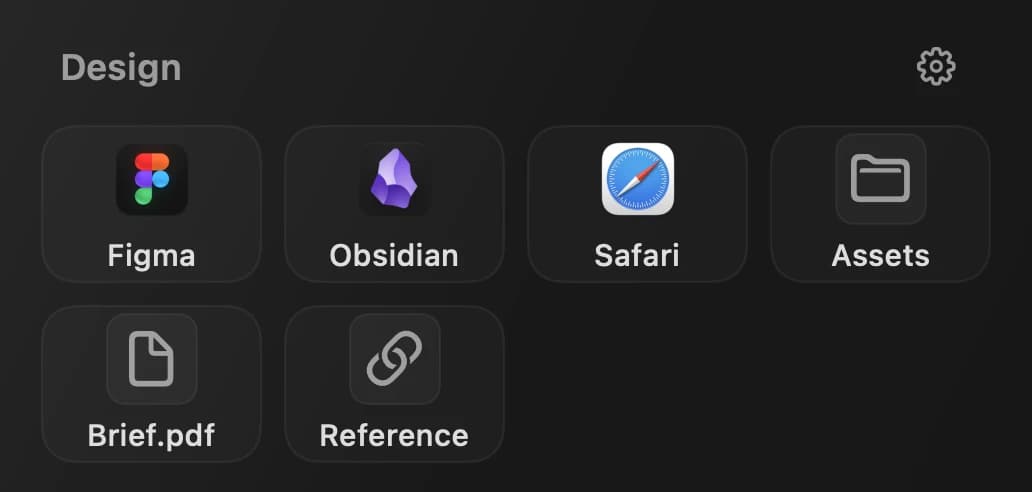
Why it sticks
Simple, private, and native
Otterdock removes a daily Dock friction without asking you to change how you work.
Local by default
Your groups and file metadata stay on your Mac.
One-Time Purchase
No subscription. Buy once and keep using it with updates.
macOS Native
Built with Swift and SwiftUI for Apple Silicon and Intel.
“A tidy Dock is a tidy mind. Otterdock turns a chaotic row of icons into organized workflow groups — so you spend less time searching and more time doing.”
Get Otterdock for macOS
Free edition includes 2 groups with up to 8 items per group.
Full Download
Direct · v1.1.3
Direct edition: Includes custom popup menus, hover actions, and global hotkeys. Requires macOS Accessibility permissions for click and hover behavior.
Download .dmgRequires macOS 14.0 Sonoma or later
Mac App Store
App Store · v1.1.0
Mac App Store edition: Distributed and updated by Apple, featuring native Dock folders and widgets.
Get on Mac App StoreRequires macOS 14.0 Sonoma or later
Choose between the Direct edition with custom popups or the Mac App Store edition using native Dock folders. Both include widgets.
Purchases and Pro licenses remain channel-specific between the direct edition and the Mac App Store edition.
Compare editionsPricing
Free to Start, One-Time Pro Upgrade
Otterdock is free with up to 2 groups and 8 items per group on macOS 14+, no account required. Upgrade anytime for a one-time US$6.99 (regional pricing may vary) to unlock unlimited spaces.
Full edition · Direct download
Full edition · Pro
$6.99
one-time purchase
- ✓All features + Pro skins
- ✓Hover-to-expand mode
- ✓Sparkle auto-updates
- ✓Priority email support
- ✓Use on up to 3 Macs
One-time purchase · Free updates
Payments secured byCreemMac App Store · v1.1.0
Mac App Store
Free
optional $6.99 Pro IAP
- ✓Core features: 2 groups, 8 items/group
- ✓Native Dock folder integration
- ✓App Store updates
- ✓Sandboxed for security
Free to download. Pro ($6.99) unlocks unlimited groups & Pro skins via one-time In-App Purchase.
Which Edition Is Right for You?
Free and Pro define your limits. App Store and Direct define how Otterdock integrates with macOS.
Compare editions
| Feature | App Store | Direct | ||
|---|---|---|---|---|
| Free | Pro | Free | Pro | |
| Included in both editions | ||||
| Workflow groups | 2 groups | Included | 2 groups | Included |
| Items per group | 8 items | Included | 8 items | Included |
| Apps, files, folders & links | Included | Included | Included | Included |
| Desktop & Notification Center Widgets | Included | Included | Included | Included |
| Drag-and-drop editing | Included | Included | Included | Included |
| In-group sorting | Included | Included | Included | Included |
| Pro icon skins | Not available | Included | Not available | Included |
| Edition differences | ||||
| Add groups to the Dock | Drag manually | Drag manually | Automatic | Automatic |
| Otterdock popup | Not available | Not available | Included | Included |
| Hover-to-expand | Not available | Not available | Included | Included |
| Global keyboard shortcuts | Not available | Not available | Included | Included |
| Per-file opening app | Not available | Not available | Not available | Included |
| Update channel | App Store | App Store | In-app | In-app |
| App sandbox | Sandboxed | Sandboxed | Outside sandbox | Outside sandbox |
Direct 1.1.3 · App Store 1.1.0
You Might Be Wondering
What is Otterdock and what does it do?
Otterdock is a macOS Dock organizer that groups apps, files, folders, and links into workflows. The Direct full edition features custom popups, hover expansion, and global shortcuts, while the Mac App Store edition uses native Dock folders. Both support desktop and Notification Center widgets.
What can I put in a group?
Apps, files, folders, and links — all in the same group. You can mix different item types freely, so a "Design" group could contain Figma, a project folder, and a reference PDF all together.
Do I have to grant permissions?
The direct download edition (Full) requires Accessibility permissions for clicking to open custom popups and for hover expansion. The Mac App Store edition uses native Dock folder stacks and does not require Accessibility permissions.
Does Otterdock collect my data?
Group configurations and full file paths are stored locally on your Mac. In the current version, optional analytics never transmit group names, item names, full file paths, or file contents, and analytics can be turned off in Settings.
Which macOS versions are supported?
macOS 14 Sonoma and later. Otterdock is built with Swift and SwiftUI, optimized for Apple Silicon and Intel Macs.
How much does Otterdock cost?
Both editions are free to download (2 groups, 8 items each); Pro is an optional one-time $6.99 purchase (Direct license via SaveTimeForFun or in-app purchase on the Mac App Store).
How is Otterdock different from macOS Dock folders?
Native Dock folders can hold documents, subfolders, web links, and aliases, but managing them manually in Finder takes effort. Otterdock provides a visual group editor and widgets on macOS 14 or later for streamlined organization.
How do I get a refund?
If you purchased from our website, contact support@savetimefor.fun for refund requests, handled according to our published policy. If you purchased from the Mac App Store, please submit your request at reportaproblem.apple.com, where refunds are reviewed by Apple.
Can I open groups with keyboard shortcuts?
Yes, the Direct full edition supports global shortcuts for each group to open them from any app. You can configure key combinations for specific groups in Settings.
Who processes Otterdock payments?
Checkout for the Direct edition is handled by Creem as the Merchant of Record. Mac App Store transactions are processed by Apple. Your groups and paths always remain stored on your local Mac.